
Administrator Control Panel - Achievement Friendly
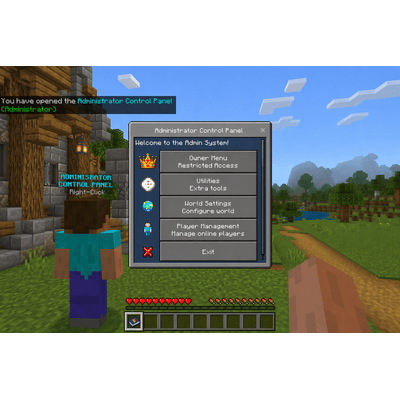
Administrator Control Panel is a powerful Minecraft Bedrock addon designed to give owners and admins an easy way to manage their world through clean in-game menus while staying achievement friendly. This addon focuses on useful world management, player management, owner controls, and admin tools without relying on Beta APIs or experimental features.
Version
3.0.4
Game Version
26.30, 26.20, 26.13, 26.12, 26.10, 26.3, 26.2, 26.1, 26.0
Category
Utility
License
All Rights Reserved
Screenshots
Description
Administrator Control Panel - Achievement Friendly
The Administrator Control Panel is an achievement-friendly Minecraft Bedrock Edition admin system designed for Realms, worlds, and servers. It provides a modern UI-based management system with customizable admin ranks, permission controls, utilities, player management tools, and world management features — all without requiring cheats or Beta APIs.
The addon is designed to work with survival worlds while keeping achievements enabled.
# Features
- Achievement-friendly design
- No cheats required
- No Beta APIs required
- Fully UI-based admin system
- Custom admin rank system
- Permission-based menus
- Works on:
- Singleplayer worlds
- Multiplayer worlds
- Realms
- Dedicated servers
# Custom Admin Rank System
Create unlimited custom admin ranks with fully customizable permissions.
Examples:
- Owner
- Moderator
- Helper
- Builder
- Event Staff
- Trial Admin
Each rank can have its own permissions enabled or disabled.
# Permission System
Permissions include:
- Kick Players
- Teleport Players
- Change Player Gamemode
- Personal Gamemode
- Run Commands
- Fill Commands
- World Settings
- Utilities Access
- Spectator Chest Viewer
- Clear Floating Items
- And more
Menus automatically update based on the player's assigned permissions.
# Player Management
Manage players directly through UI menus.
Features include:
- Set Survival
- Set Creative
- Set Adventure
- Set Spectator
- Teleport To Players
- Teleport Players To You
- Random Teleport
- Levitate Players
- Kick Players
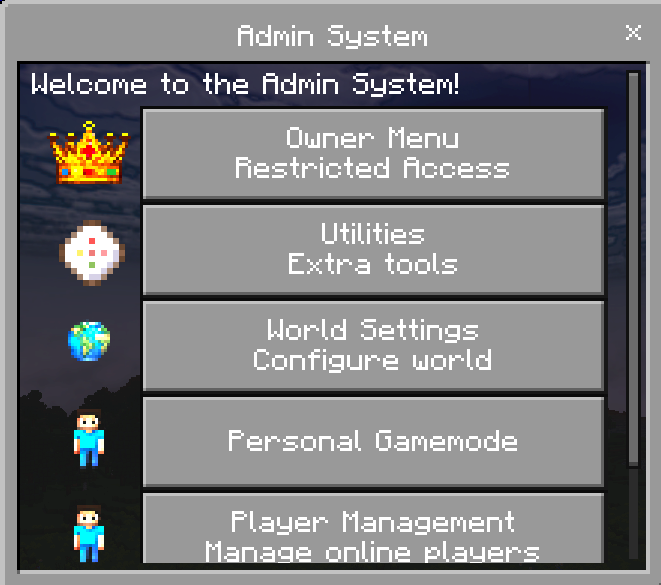
# Personal Gamemode
Admins can quickly change their own gamemode using the Personal Gamemode menu.
Supported gamemodes:
- Survival
- Creative
- Adventure
- Spectator
# Admin Menu Access
The addon supports two admin menu access methods.
## Option 1 (Recommended)
Use the included admin item:
- admin:rod
## Option 2
Rename ANY item to:
- Admin Settings
Then use the renamed item to open the admin menu.
Renamed items:
- Keep their custom name
- Support keep on death
- Continue working after updates
# Language Support
Includes support for:
- English
- Thai
อัปเดตใหม่ รองรับภาษาไทยแล้ว
The addon uses Minecraft Bedrock language files for improved compatibility with multiple languages.
# Installation
# New Installation
1. Download the addon
2. Import the:
- Behavior Pack
- Resource Pack
3. Activate both packs on your world
4. Join the world
5. The first player to join becomes the permanent owner
# Updating The Addon
1. Remove the OLD versions of:
- Behavior Pack
- Resource Pack
2. Import the NEW versions
3. Re-enable both packs on the world
4. Load the world
Your saved admin data, ranks, and settings should remain intact.
# Important Update Notes
- Do NOT change dynamic property keys
- Always keep both packs updated together
- Back up your world before major updates
- Old admin items may update automatically when used
# Compatibility
Compatible with:
- Minecraft Bedrock Edition
- Realms
- Dedicated Servers
- Multiplayer Worlds
Designed for long-term survival gameplay and admin management without disabling achievements.
Changelog
Changelog v3.0.6
Player Manager Improvements
- Added pagination to the Owner Player Manager
- Displays up to 10 players per page
- Added Previous Page and Next Page navigation
- Added current page and total page indicators
- Updated the Owner Player Manager to refresh currently connected players before displaying the saved player list
- Improved detection of currently online players in saved player history
- Updated player sorting for easier navigation:
- Online players are displayed first
- Online players are sorted alphabetically A-Z
- Offline players are displayed after online players
- Offline players are sorted alphabetically A-Z
- Optimized online player detection to reduce unnecessary player-list checks when loading large player histories
Online Player Management Improvements
- Added pagination to the online Player Management menu
- Displays up to 10 players per page
- Added Previous Page and Next Page navigation
- Added current page and total page indicators
- Updated online players to display alphabetically A-Z
- Improved handling of larger online player lists to reduce menu loading and potential stuttering
Localization Updates
- Added localization support for the new Player Manager pagination interface
- Added translations for:
- Page indicators
- Previous Page
- Next Page
- Online Players
- Updated all currently supported language files:
- English (US)
- Thai
- German
- Spanish (Mexico)
Performance Improvements
- Reduced repeated online player lookups while sorting saved player history
- Improved Player Manager menu loading when a world contains a large number of saved players
- Reduced the number of players loaded into a single menu page
Changelog v3.0.4
Time Settings Fix
- Fixed time changes resetting the world back to Day 1
- Time buttons now move time forward to the next selected time instead of resetting the day count
- Updated preset time options:
- Day
- Night
- Midnight
- Sunset
- Sunrise
Improvements
- Time changes now better preserve world progression
- Improved behavior for worlds where admins adjust time often
Changelog v3.0.3
Admin System Overhaul
- Removed fixed admin tiers:
- Basic Admin
- OP Admin
- Replaced with fully customizable admin rank system
Custom Admin Ranks
- Added unlimited custom admin ranks
- Added custom rank names:
- Starter Admin
- Moderator
- Helper
- Or any custom name
- Added per-rank permission toggles:
- Kick Players
- Teleport Players
- Change Gamemode
- Personal Gamemode
- Run Commands
- Fill Commands
- Clear Dropped Items
- Utilities Access
- World Settings Access
- And more
Player Admin Management
- Added player-to-rank assignment system
- Added ability to edit admin roles at any time
- Added support for online and offline player management
- Added admin list viewer
- Added easier admin removal system
Permission-Based UI
- Menus now dynamically show only allowed actions
- Prevents unauthorized actions from appearing
- Simplified menus for each admin rank
Personal Gamemode Feature
- Added new Personal Gamemode menu
- Allows admins to quickly change their own gamemode
- Added permission toggle support for Personal Gamemode
- Supports:
- Survival
- Creative
- Adventure
- Spectator
Utilities Menu Updates
- Utilities are now fully permission-based
- Added toggle support for:
- Fill Commands
- Run Commands
- Clear Floating Items
- Spectator Chest Viewer
Admin Item System Changes
- Removed automatic admin item giving
- Added renamed-item admin menu support:
- Rename ANY item to "Admin Settings"
- Use the renamed item to open the admin menu
- Added player notification explaining how to access the menu
Renamed Admin Item Improvements
- Admin Settings renamed items now:
- Keep their custom name
- Automatically update with keep on death
- Continue working across updates
- admin:rod is still fully supported
- Removed inventory lock behavior from admin items
- Admin items now use keep on death only
Language Support Improvements
- Added additional language key support for:
- Admin menus
- Permissions
- Messages
- Personal Gamemode
- Custom admin ranks
- Improved Thai language compatibility
- Added new Thai translations for added features
Mute System Removal
- Removed mute system due to API limitations
- Prevents broken or non-functional menu options
- May return in a future update if API support improves
Code Cleanup & Stability
- Removed unused mute system code
- Cleaned up legacy admin logic
- Improved renamed-item detection reliability
- Improved error handling
- Improved compatibility across Bedrock versions
- General performance and stability improvements
Changelog v3.0.2
Player Management Improvements
- Replaced Game Mode buttons with a dropdown menu:
- Creative
- Survival
- Spectator with Night Vision fix
- Adventure
- Replaced Teleport buttons with a dropdown menu:
- Teleport Player To You
- Teleport To Player
- Random Teleport moved into teleport menu
UI & Menu Enhancements
- Reduced button clutter in Player Management menu
- Improved navigation flow with cleaner layout
- Maintained Back and Exit button consistency
Kick Player Update
- Reworked Kick confirmation to use button-based UI
- Added icon support to confirmation buttons
- Added custom boot icon for Kick Player action
Code & System Fixes
- Fixed admin menu opening incorrect menu for Basic Admins
- Updated item use handler to properly route menus based on permissions
- Improved overall menu reliability and error handling
Localization
- Added new language keys for Set Game Mode and Teleport Player
- Added Thai translations for new menu options
General Improvements
- Cleaner, more user-friendly admin experience
- Reduced chance of accidental actions
- Better organization of player-related tools
Changelog v3.0.1
UI & Menu Overhaul
- Removed OP Tools menu completely
- Reorganized system into cleaner structure:
- Utilities
- World Settings
- Player Management
- Simplified navigation and reduced menu clutter
Player Management Rework
- Changed flow to player-first selection
- Now shows all online players, including yourself
- Added new per-player action system
- Converted actions into direct buttons for faster access
Player Actions
- Set Creative
- Set Survival
- Set Spectator with Night Vision fix
- Set Adventure
- TP Player To You
- TP To Player
- Kick Player with confirmation
- Random Teleport
- Levitate Player with fixed timing and effect behavior
Navigation & UI System Refactor
- Added universal Back and Exit buttons to all menus
- Added reusable UI helpers for cleaner menu handling
- Standardized button order across all menus
- Fixed submenu routing issues after the refactor
Utilities Menu Expansion
- Fill Commands moved to utilities.js
- Clear Floating Items moved from OP Tools
- Run Command moved from main menu
- Spectator Chest View toggle moved from OP Tools
Language Support
- Added full localization system support across all menus
- Implemented translation-based UI using translate keys
- Added Thai language support using th_TH.lang
- Prepared system for future languages
Result
- Faster navigation
- Cleaner UI experience
- Less menu frustration
- Multi-language ready system
- More professional feel across the entire addon
Changelog v3.0.0
- Added permanent saved owner support using world dynamic properties
- Updated owner data storage to include player xuid for better owner protection and matching
- Added owner sync so the saved owner can keep or regain the admin_owner tag
- Added owner transfer support with optional old owner tag removal
- Added Owner Player Management to the Owner Menu
- Added saved player history using world dynamic properties
- Added automatic player history saving when players join
- Added banned players storage using world dynamic properties
- Added ban player menu for saved offline and online players
- Added unban player menu
- Added banned players list viewer
- Added saved players list viewer
- Added automatic banned player enforcement on join
- Added repeating banned player checks while players are online
- Added owner protection so the saved owner cannot be banned
- Added spectator chest viewer system
- Added Delete Slot, Clear Chest, Refresh, and Close options
- Added Spectator Chest View ON/OFF toggle in the OP Tools menu
- Added double sneak support in Spectator mode to open the admin menu
How the Ban System Works
- Player name and xuid are saved into world dynamic player history on join
- Banned players are stored in a separate world dynamic list
- The system checks banned players by both player name and xuid
- The saved owner and current owner are protected from being banned
- Banned players are kicked on join and checked while online
How the Spectator Chest Viewer Works
- Admins in Spectator mode can look at a container block and open the Chest Admin Viewer
- The toggle is saved per player using a player dynamic property
- The viewer shows block type, location, and chest slots
- Admins can delete slots, clear the chest, refresh contents, or close the viewer
Previous Changelog v2.2.1
- Added hit particle effect for the Admin Item when attacking entities
- Admin Item now spawns a critical-hit particle on successful mob and player hits
- Particle effect only triggers when holding Admin Settings in the main hand
- Added a separate Admin Reset stick for testing and troubleshooting
- Added permanent owner saving with dynamic properties
- Added automatic first-owner claim system
- Added owner tag syncing if the saved owner loses admin_owner
- Added Owner Transfer option in the Owner Menu
- Fixed missing and broken menu paths
- Fixed OP Tools menu opening
- Fixed Fill Commands menu opening
- Fixed Player Management menu routing
- Removed SimpleTag addon dependency for admin_owner management
Previous Changelog v2.2.0
- Added visual subpacks for the Administrator Control Panel tool
- Added 3 visual modes:
- Classic Wand style
- Diamond Sword Combat style
- Netherite Sword Elite style
- Updated the manifest with the subpacks module for texture swapping
- Optimized for Minecraft 1.21.80 and higher
Previous Changelog v2.1.10
- Added permanent saved owner system
- Added unique owner dynamic property storage
- Added automatic first-owner claim
- Added automatic owner tag restore
- Added owner transfer option in Owner Menu
- Added optional old owner tag removal during transfer
- Fixed missing menu functions
- Fixed OP Tools menu
- Fixed Fill Commands menu
- Fixed player menu routing
- Fixed settings back button routing
- Fixed Auto-Clear menu routing
- Removed unused code
- Removed SimpleTag dependency for admin_owner handling